How long is too long? The answer may surprise you!
tl;dr: It’s 30 minutes.
To support tasks that take a long time AWS Elastic Beanstalk provides Worker Environments to make developing applications which consume an SQS queue easier. There are a lot of benefits to this but it does come with some caveats if your jobs take longer than Beanstalk expects out of the box.
The worker tier is laid out like so.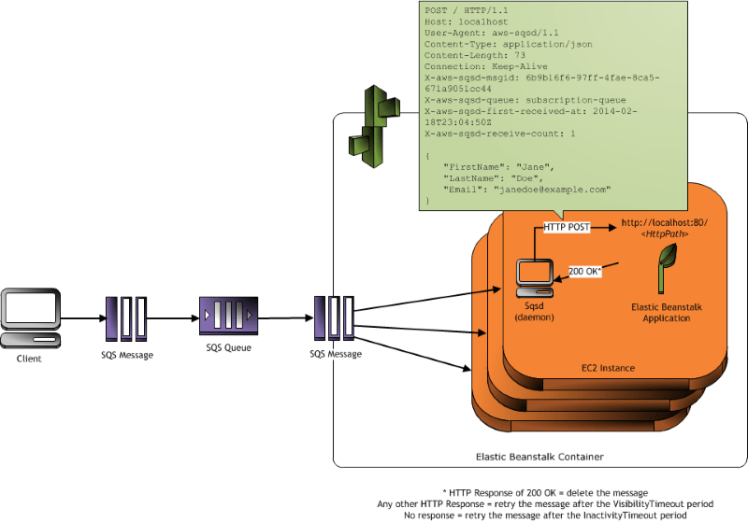
Between SQS and the application are a daemon (sqsd) which reads from SQS and posts the message to your app through an nginx proxy. This provides some really nice abstractions for developing but when it comes to long running jobs the devil is in the timeouts.
SQS
Visibility timeout is the main setting here. It will need to be set to something greater than how long you expect processing to actually take. One notable omission out of the box for the worker environment is the ability to scale based on queue depth. Beanstalk supports creating additional resources via CloudFormation so this can be set up via a config file in the .ebextensions folder. (source)
Resources:
  QueueDepthAlarmHigh:
    Type: AWS::CloudWatch::Alarm
    Properties:
      Namespace: "AWS/SQS"
      MetricName: ApproximateNumberOfMessagesVisible
      Dimensions:
        - Name: QueueName
          Value: { "Fn::GetAtt" : ["AWSEBWorkerQueue", "QueueName"] }
      Statistic: Sum
      Period: 60
      EvaluationPeriods: 1
      Threshold: 1
      ComparisonOperator: GreaterThanOrEqualToThreshold
      AlarmActions:
      - Ref: ScaleOutPolicy

  QueueDepthAlarmLow:
    Type: AWS::CloudWatch::Alarm
    Properties:
      Namespace: "AWS/SQS"
      MetricName: ApproximateNumberOfMessagesVisible
      Dimensions:
        - Name: QueueName
          Value: { "Fn::GetAtt" : ["AWSEBWorkerQueue", "QueueName"] }
      Statistic: Sum
      Period: 300
      EvaluationPeriods: 6
      Threshold: 0
      ComparisonOperator: LessThanOrEqualToThreshold
      AlarmActions:
      - Ref: ScaleInPolicy

  ScaleOutPolicy:
    Type: AWS::AutoScaling::ScalingPolicy
    Properties:
      AdjustmentType: ChangeInCapacity
      AutoScalingGroupName:
        Ref: AWSEBAutoScalingGroup
      ScalingAdjustment: 1

  ScaleInPolicy:
    Type: AWS::AutoScaling::ScalingPolicy
    Properties:
      AdjustmentType: ChangeInCapacity
      AutoScalingGroupName:
        Ref: AWSEBAutoScalingGroup
      ScalingAdjustment: -1
Nginx
For really long running jobs you may need to extend the proxy timeouts in nginx. You can do that with a config file placed in .ebextentions like so. (source)
files:
  "/tmp/proxy.conf":
    mode: "000644"
    owner: root
    group: root
    content: |
      proxy_connect_timeout 1800;
      proxy_send_timeout 1800;
      proxy_read_timeout 1800;
      send_timeout       1800;

container_commands:
  00-add-config:
    command: cat /tmp/proxy.conf > /var/elasticbeanstalk/staging/nginx/conf.d/00_elastic_beanstalk_proxy.conf
  01-restart-nginx:
    command: /sbin/service nginx restart
SQSD
The next timeout you’ll want to visit is the inactivity timeout setting in the worker details. This determines how long the SQS daemon will wait for the application to respond for a given message. The caveat here is that the max value for this setting is 30 minutes. This means that if your jobs regularly take >30 minutes you are S.O.L. Of course you could construct the application to fork off from the request thread but then you lose the ability to properly respond with a success or failure for each message.
Conclusion
The Elastic Beanstalk Worker Environment is nice if it fits your workloads. If, like me, you have jobs that take longer than 30 minutes it might not be the best fit. In this case I ended up creating a Terraform module to create custom autoscaling groups and integrated directly with SQS in the application. I do however miss the decoupling of the application to SQS provided by Beanstalk. Luckily there are a number of open source alternatives to aws-sqsd that I may explore in the future.
 Bur.net